
The Aquascape Remote control works with the Aquasurge and the Aquaforce Pumps to increase and decrease the water flow over your waterfall or fountain. 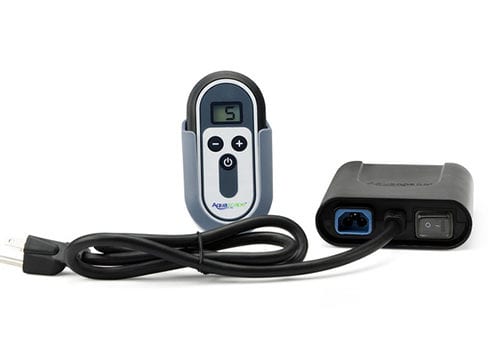 There are two parts included with the remote control system. The Remote Control transmitter and the Receiver are paired together. If a replacement unit is needed you will need to replace both. Both are included in the Replacement Kit (available at Splash Supply Co. in York, PA or call 717-751-2108).
To operate your Aquasurge pump with the Aquascape Remote Control you will need to make sure the Receiver switch is in Position 1 which is the “O” on the back of the receiver.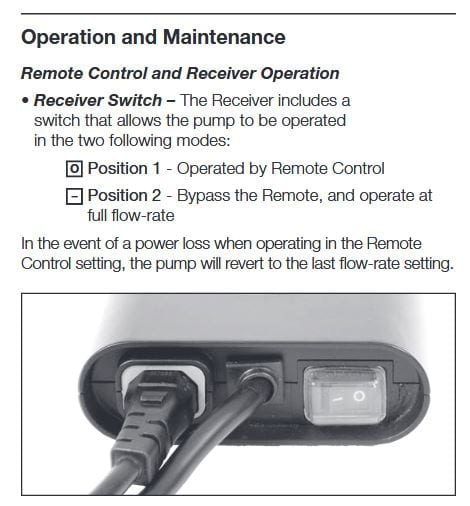
Switch the receiver to Position 2 “-” to Bypass the Remote and operate at full flow rate.
The Transmitter has a Plus “+” and a Minus “-” button to increase or decrease the flow.
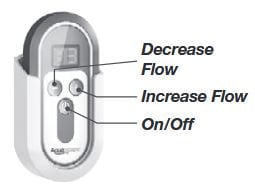 There is also an On/Off button.
To change the battery, you will need a small philips head screwdriver to remove the four small screws on the back.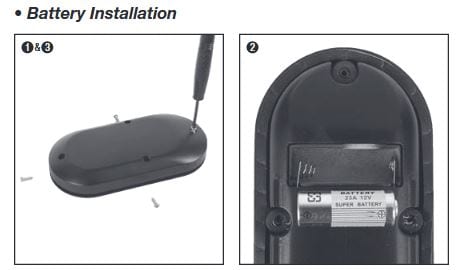
A replacement battery for your Aquasurge Pump Remote Control is available at Splash Supply Co. or call 717-751-2108.
For more detailed information about your Aquasurge Pump you can download the PDF instruction manual here: Aquascape_AquaSurge_PRO_Instructions